Work order app template for maintenance teams
GoodTaco’s work order app template takes repair requests from a link, gives every job a number, a priority and a due date, and tracks it to done. It’s a working app with sample data that your team can start using today, not a form to print.
A work order tracking system, ready to use
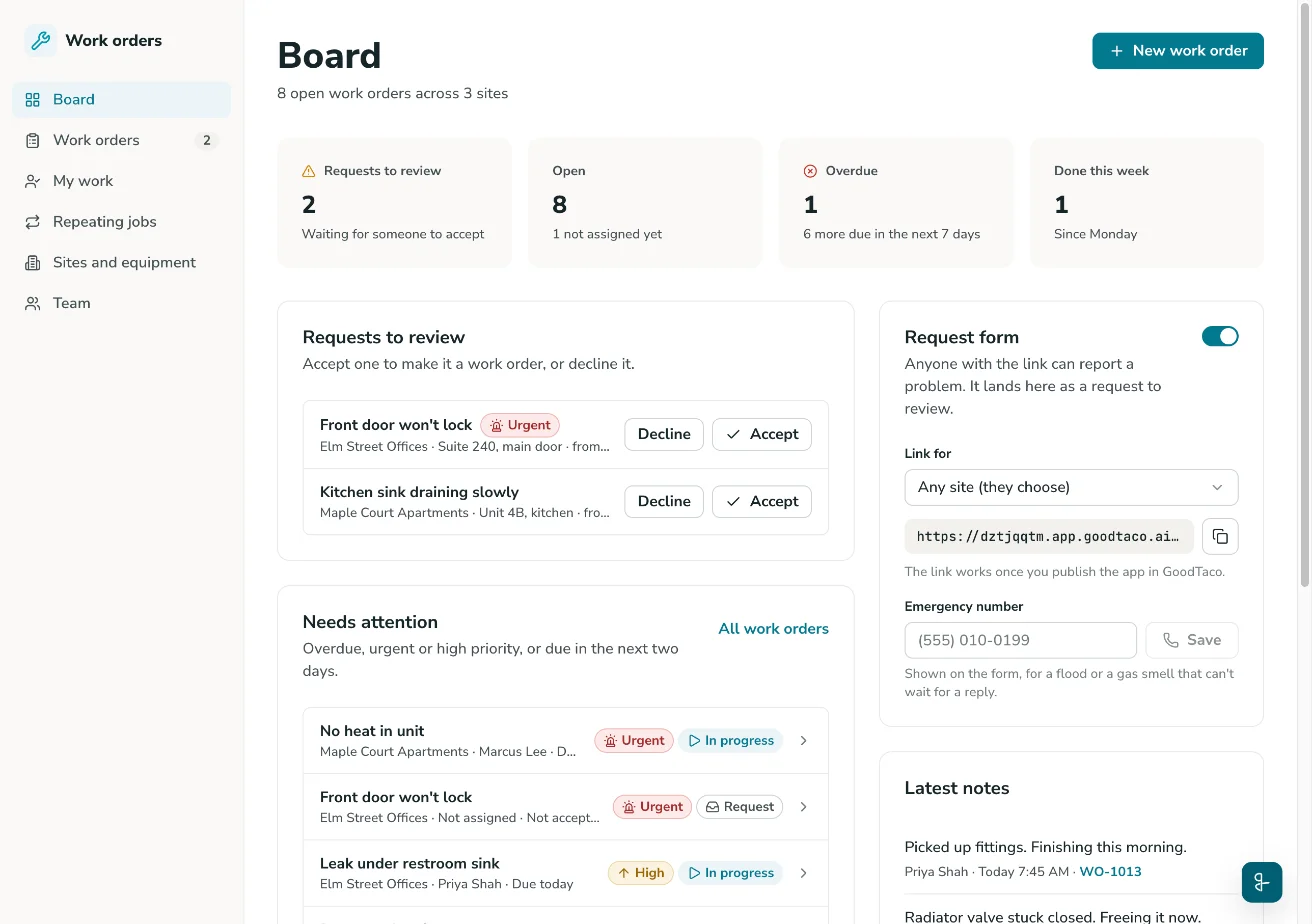
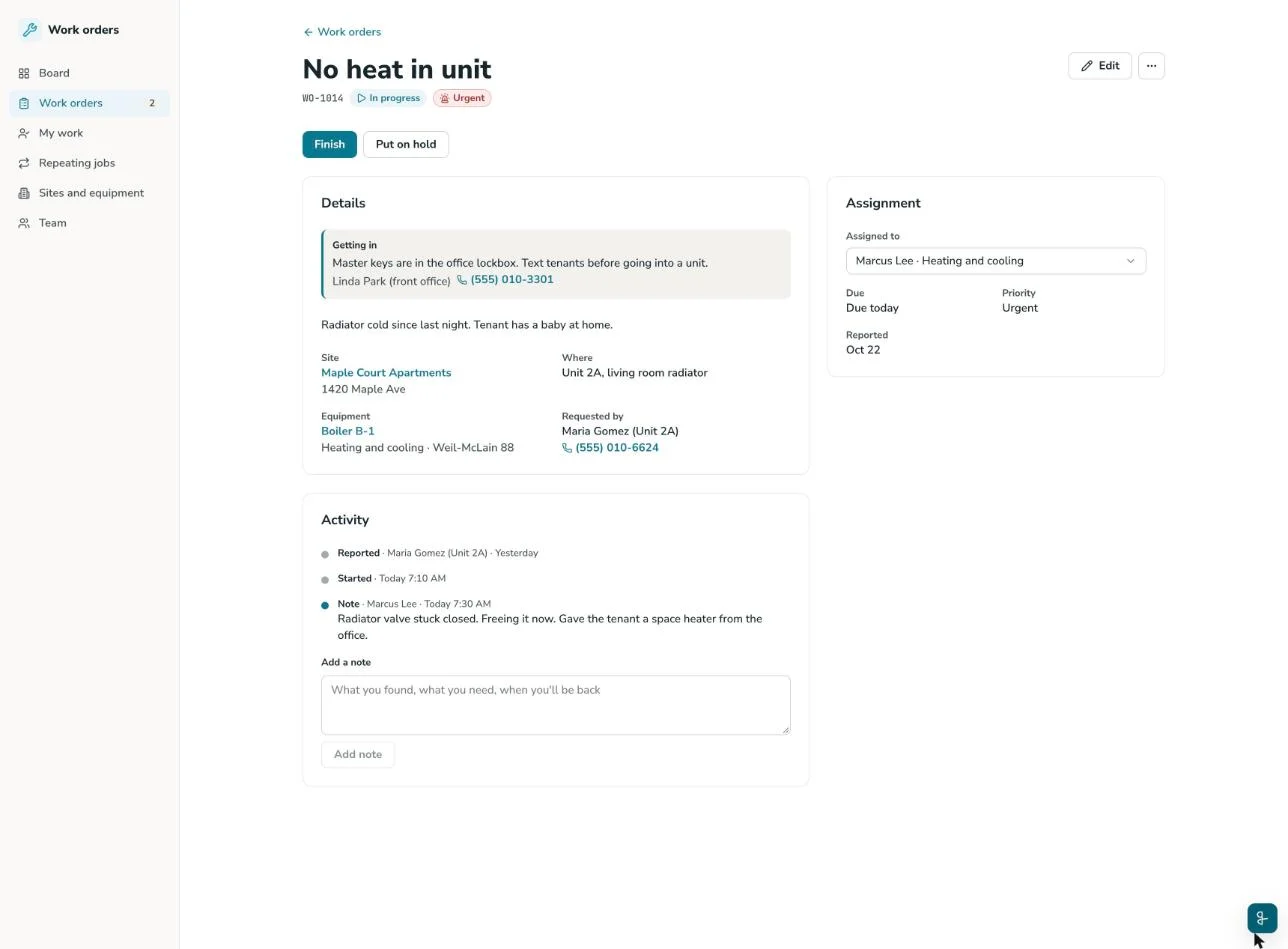
This template gives you a working maintenance work order system: a board for the office, a My work list for technicians, and a request page for tenants, customers and coworkers. Your copy comes with sample records from Harborview Property Services. It’s a small maintenance team that looks after an apartment building, an office building and a retail plaza.
Every job gets a number, starting at WO-1001, plus a priority and a due date. Assign it to someone on your team, or leave it up for grabs. The app shows what’s overdue, keeps each machine’s repair history and adds up what the work cost. Want a form to print instead? Our work order template guide has a layout to copy, field by field.
Why use a maintenance work order system
Stop losing requests in texts and voicemails. Every problem reported through the request page lands on the board as a request to review, urgent ones first, with who sent it and how to reach them.
See what’s late before anyone calls about it. The board’s Needs attention list shows jobs that are overdue, urgent, high priority or due in the next two days, so each morning starts with the right work.
Know what each building and machine costs you. The Done tab adds up labor hours, parts and contractor costs by month and by site. Each piece of equipment shows its work order history, with the hours and parts spent on it.
Template features
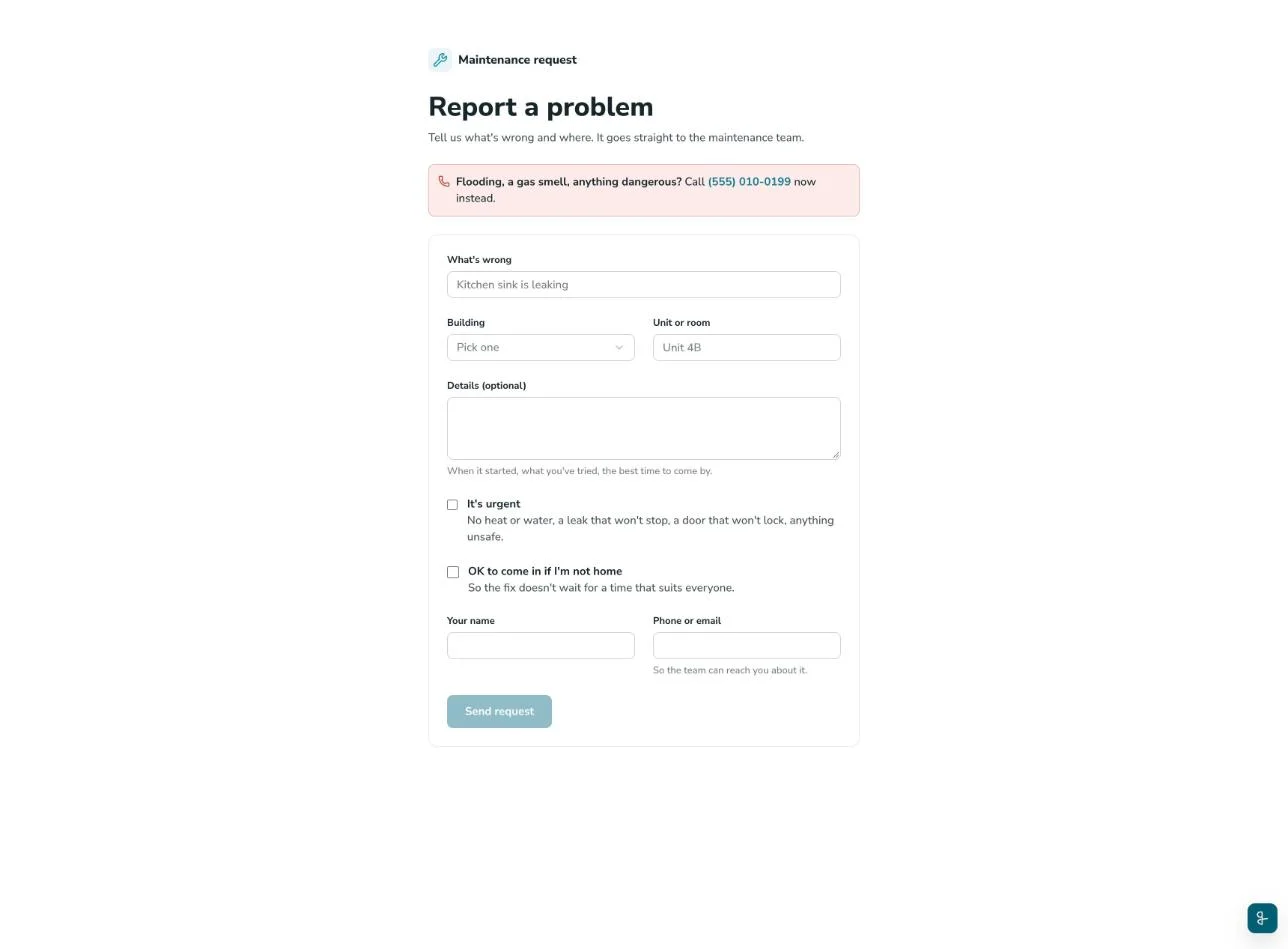
Request page. Anyone with the link can report a problem without signing in, once you publish the app with its public link. They say what’s wrong and where, tick “It’s urgent” when it is, and see their work order number as soon as they send it. Make a link for each building so the form already knows where the problem is, and add an emergency number to show at the top. Our maintenance request form guide covers what to ask.
Board. Requests to review, open jobs, overdue jobs and work done this week, at a glance. Accept a request to make it a work order, or decline it. Leave the board open on the office screen: the browser tab shows how many requests are waiting.
Priorities with due dates built in. Pick one of four priorities and the due date fills in. Urgent is due the same day, High the next day, Normal within 7 days and Low within 14 days. You can change the date for any job.
My work. One technician’s open jobs, most pressing first, in any phone’s browser: how to get in, directions to the site, and Start, Put on hold and Finish buttons. Below them, Up for grabs lists open work nobody’s assigned to: take a job and it moves to the list.
Status from request to done. Each work order has a status: Requested (from the request page), Open, In progress, On hold, Done or Cancelled. On hold records what the job is waiting on, such as a part or a contractor. Notes build a timeline on every work order, and any work order prints for the clipboard.
Close-outs and costs. Finishing a job records what was done, labor hours, parts cost and contractor cost. The Done tab adds them up for any month, shows the average time to finish, and exports the jobs as a CSV file for invoicing or the budget.
Repeating jobs. Set preventive maintenance to repeat every so many days, weeks or months: boiler checks, filter changes, fire alarm tests. Each work order is created a set number of days before it’s due (7 by default) when someone who can edit opens the app. It goes to the assigned technician’s My work. Our preventive maintenance checklist has jobs to start with.
Sites and equipment. Each site keeps its address, on-site contact and access notes. Each piece of equipment keeps its make and model, serial number and install date, with its own work order history.
Who this work order app is for
Property managers and landlords: take tenant requests by building and unit, see whether it’s OK to go in, and keep every property’s repairs in one place.
Facilities and building maintenance teams: look after offices, plazas and warehouses, from rooftop units to elevators, with a work order management system that’s ready in minutes, not months.
HVAC, plumbing and electrical contractors: set up each customer’s site with its access notes, assign jobs to your crew, and record the hours, parts and subcontractor costs for the invoice.
Shops, restaurants and warehouses that fix their own equipment: log dock doors, walk-in coolers and forklifts as equipment, and see the jobs, hours and parts each one takes.
How to set up the work order app
Copy the template. Sign up free and you land in your own copy of the work order app, with sample records to try it on.
Make it yours. Rename the sites, equipment and team to your own, or clear the sample data and add your first site.
Publish and share the request link. Publish the app, then copy the request page link for each building and share it with tenants, customers or coworkers.
Run the work from the board. Accept requests and assign technicians from the board, and add repeating jobs on the Repeating jobs page. Your team picks up its jobs from the board and My work.
Need something the template doesn’t have, such as a job type or a checked-by sign-off? Ask GoodTaco in plain words and it changes the app for you. Already keep a work order log in Excel or a CSV file? Go from spreadsheet to app instead. Keep it in Google Sheets? Our Google Sheets app builder works on the sheet you already use.
Run every work order from one board
Still tracking repairs on paper, in a spreadsheet or in a group text? Copy the work order app, add your buildings and share the request link today.
Use the work order template, free
Work order app template FAQs
What is a work order app?
A work order app takes the place of the paper form and the spreadsheet log. Requests come in, each job gets a number, a priority, a due date and someone to do it, and the whole team can see what’s open and what’s late. This template is a working work order app you copy, then change to fit your team.
Does the template cost anything?
No. The template is free to copy, and GoodTaco is free to start, with no credit card needed. Sign up and your copy is ready in minutes, with sample records to try.
How do tenants and customers report a problem?
Through the request page. Anyone with the link can use it without signing in, once you publish the app with its public link. They pick the building, say what’s wrong and where, and get a work order number back. The request waits on the board until someone accepts or declines it.
How do priorities and due dates work?
There are four priorities. Urgent is due the same day, High the next day, Normal within 7 days and Low within 14 days. The due date fills in from the priority, and you can change it. True emergencies, such as a burst pipe or a gas smell, are phoned in first, then logged as Urgent.
Can technicians use it on their phones?
Yes. The app works in any browser, including a phone’s, with tabs at the bottom for the board, the work orders and My work. My work shows one technician’s open jobs at a time, with directions to the site and buttons to start, put on hold and finish each one.
Does it handle preventive maintenance?
Yes, with repeating jobs. Set a job to repeat every so many days, weeks or months, and pick its site, equipment and technician. Each work order is created a set number of days before it’s due (7 by default) when someone who can edit opens the app.
Is this a CMMS?
It covers the core of one for a small team: maintenance requests, work orders, equipment history, repeating preventive maintenance and job costs. Need more, such as a parts list? Ask GoodTaco and it adds it to your app.
Who can see the work orders?
Only people signed in to your GoodTaco workspace see the board and the work orders. Admins and Developers can edit, and Viewers can only look. Anyone else with the link gets the request page and nothing more.
Can I track what each job costs?
Yes. Each close-out records labor hours, parts cost and contractor cost. The Done tab totals them for any month and exports the jobs as a CSV file, and each piece of equipment shows the hours and parts spent on it.
Can I change the template?
Yes, it’s your app. Ask GoodTaco in plain words, such as “add a checked-by name to the close-out”, and it changes the app for you. You can also start from your own Google Sheet or Excel file instead of the template.